I seem to burn far to many hours trying to do the relatively simple task of setting up log4net on a project. Well step one is easy enough, install through nuget. Next...
Add web.config settings
I like to create a separate config file for log4net because it keeps things simpler. So add the following config:
<configSections><section name="log4net" type="log4net.Config.Log4NetConfigurationSectionHandler, log4net" /></configSections><!-- more config --><log4net configSource="log4net.config" />
Add the log4net config file
Next add a file called log4net to your solution and add the following config. This is a good starting point, logging to a file and also to the console. There is ALOT of config options for log4net, but this is a good starting point:
<?xml version="1.0" encoding="utf-8"?><log4net><!-- Log to vs output window --><appender name="TraceAppender" type="log4net.Appender.TraceAppender" ><layout type="log4net.Layout.PatternLayout"><conversionPattern value="%timestamp [%level] %-60message %newline" /></layout></appender><!-- Log to console app window --><appender name="Console" type="log4net.Appender.ConsoleAppender"><layout type="log4net.Layout.PatternLayout"><conversionPattern value="%message%newline" /></layout></appender><!-- Log to a file --><appender name="RollingFileAppender" type="log4net.Appender.RollingFileAppender"><file value="Logs\log.log" /><appendToFile value="true" /><rollingStyle value="Size" /><maxSizeRollBackups value="10" /><maximumFileSize value="1MB" /><staticLogFileName value="true" /><layout type="log4net.Layout.PatternLayout"><conversionPattern value="%date [%thread] %level %logger - %message%newline" /></layout></appender><root><level value="ALL" /><appender-ref ref="TraceAppender" /><appender-ref ref="Console" /><appender-ref ref="RollingFileAppender"/></root></log4net>
Don't forget to set the log4net.config file to Copy Local in visual studio properties window.
Initalise the xml config
This is the bit I always forget. One line of code you stick somewhere in your app startup to get log4net to initialise using the xml configuration we just added;
public class MvcApplication : System.Web.HttpApplication{protected void Application_Start(){// Configure log4netlog4net.Config.XmlConfigurator.Configure();}}
Write log statements
Now we are free to make full use of the log4net logging capabilities. First declare a logger at the top of the class, then log away:
private static readonly ILog _logger = LogManager.GetLogger(System.Reflection.MethodBase.GetCurrentMethod().DeclaringType);public ActionResult Index(){_logger.Info("Displaying the home page");return View();}
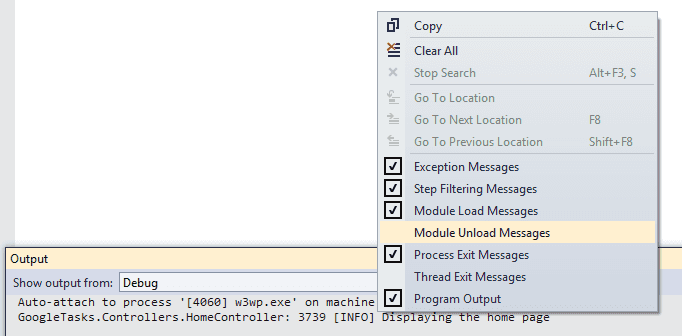
Finally if you are using the Visual Studio output window, its worth knowing that you can right click and turn off the white noise: